TruePx Add to Chrome

Pixel ruler, CSS inspector, SEO checker and site audit

Hover any element to see its exact size, padding and margin, and click two to measure the gap between them. Edit the CSS live, find broken links and SEO issues, and audit the page for accessibility, speed and security, right where each problem is. No DevTools needed.

Add to Chrome, it's free

No account. No setup. Works on every website you open in Chrome.

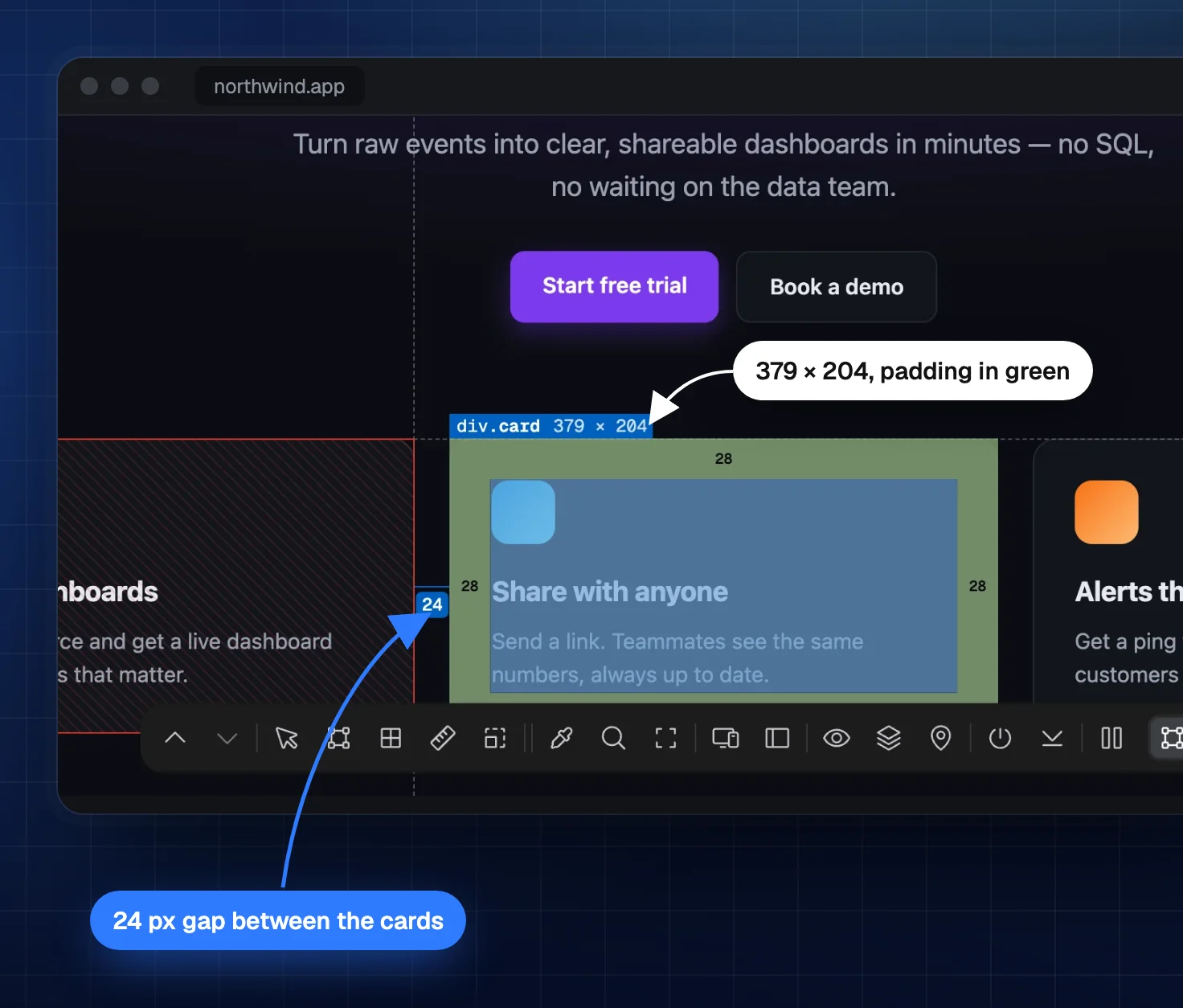
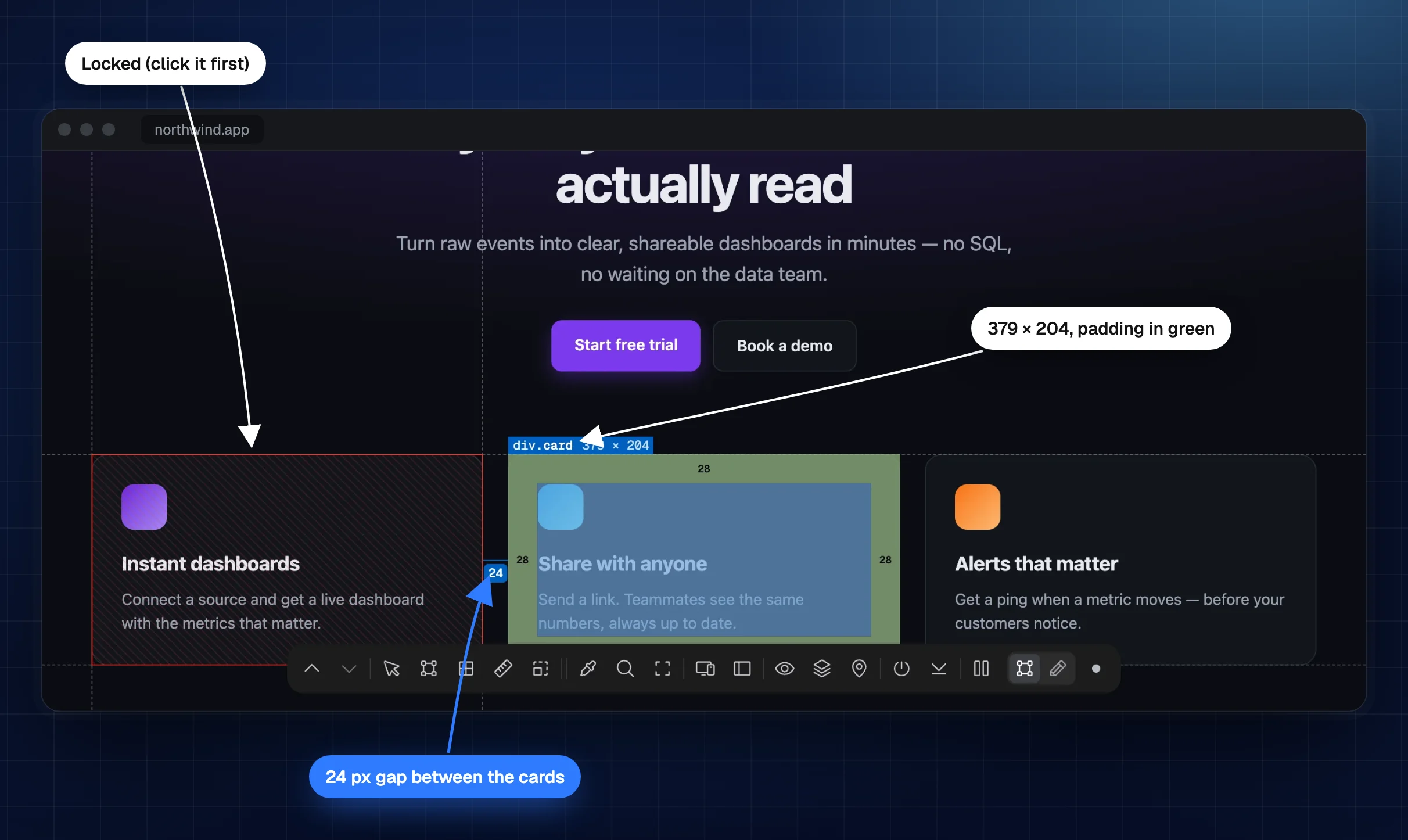
TruePx measuring a page: the first card locked in red, the second hovered with its size 379 × 204 and padding in green, and the 24 px gap between them
The first card is locked (red). Hovering the second card shows its size, its padding in green and the 24px gap between the two.

How to use TruePx

It takes a second to start and nothing to learn. Everything happens on the page you are already looking at.

  1. Turn it on

    Click the TruePx icon in the toolbar or press Alt Shift S on any page. A small dock appears at the bottom.

  2. Hover and click

    Hover to see sizes and spacing. Click an element to lock it, then hover another one to measure the distance.

  3. Inspect or edit

    Press 0 to open the side panel with the element's CSS. Switch to Edit to change it live and copy what works.

  4. Turn it off

    Press Esc or click the icon again. The page goes back to normal; your edits stay until you revert them.

What TruePx does

A pixel ruler, CSS inspector, live editor, responsive tester, color picker, font inspector and page auditor in one Chrome extension.

Pixel ruler

Measure anything on the page

See the width, height, padding and margin of any element just by pointing at it. No screenshots to crop, no design file to open.

  • Size on hover with padding (green) and margin (orange) bands
  • Distance between elements: lock one, hover another
  • Rulers and crosshair guides along the page edges
  • Layout grid overlay to check columns and alignment
  • X-ray outlines every element at once
  • Parent and child with Alt Shift ↑ ↓
TruePx measuring a card on the page: its size 379 × 204 with padding in green, and the 24 px gap to the card next to it
TruePx X-ray mode outlining every box on the page at once
X-ray mode shows the structure of the whole page.

CSS inspector

See exactly how anything is built

Click an element and the side panel shows what DevTools would, in a form you can read at a glance and copy in one click.

  • Box model with margin, border, padding and content size
  • Computed styles and the real CSS rules behind them
  • Tailwind classes that reproduce the element
  • Flexbox and grid details for layout containers
  • Floating inspector that follows your cursor (press 1)
  • Find by selector to jump to any element (press 7)
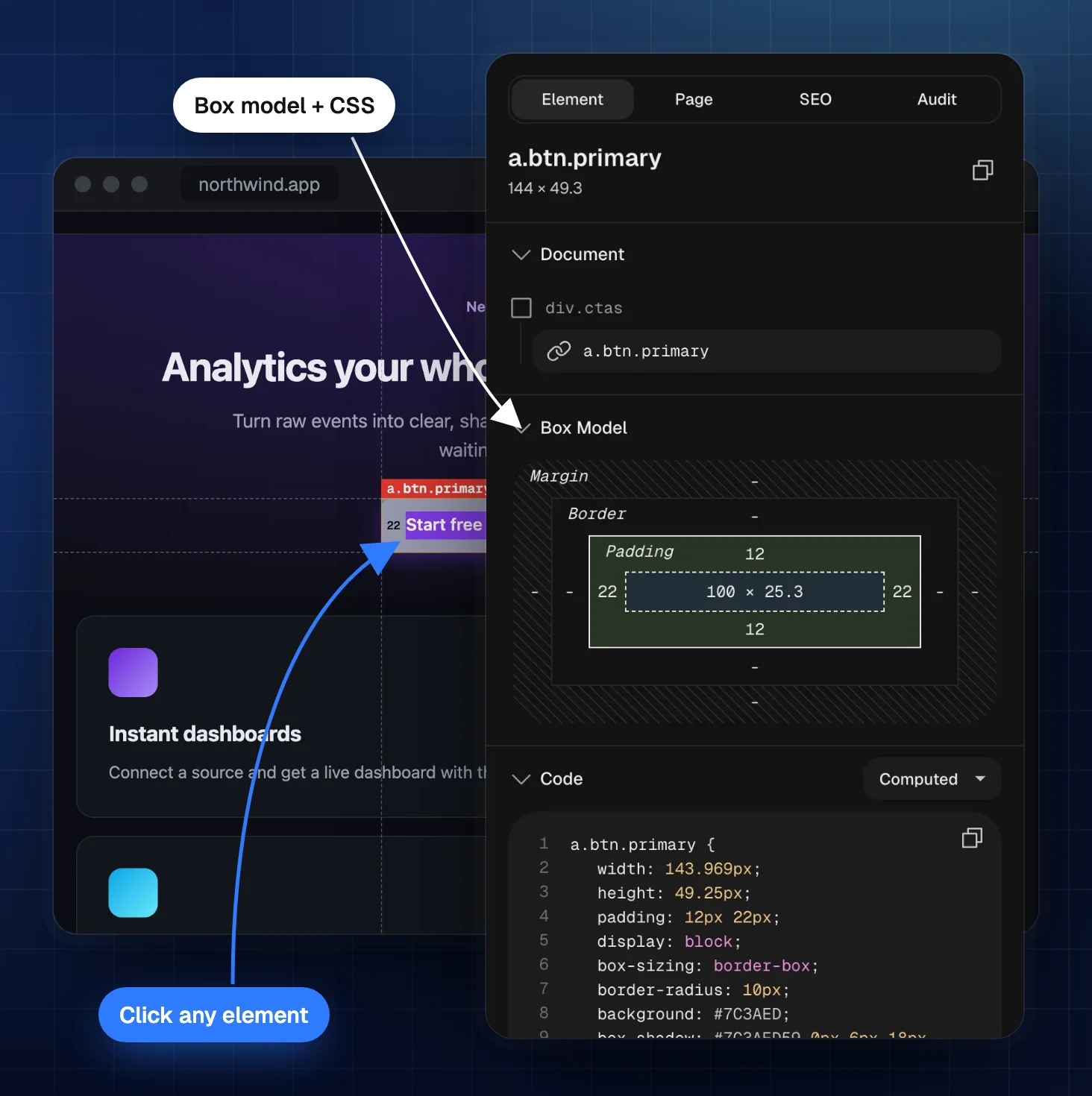
TruePx side panel showing the box model and computed CSS of the button selected on the page

Live CSS editor

Try changes on the real page

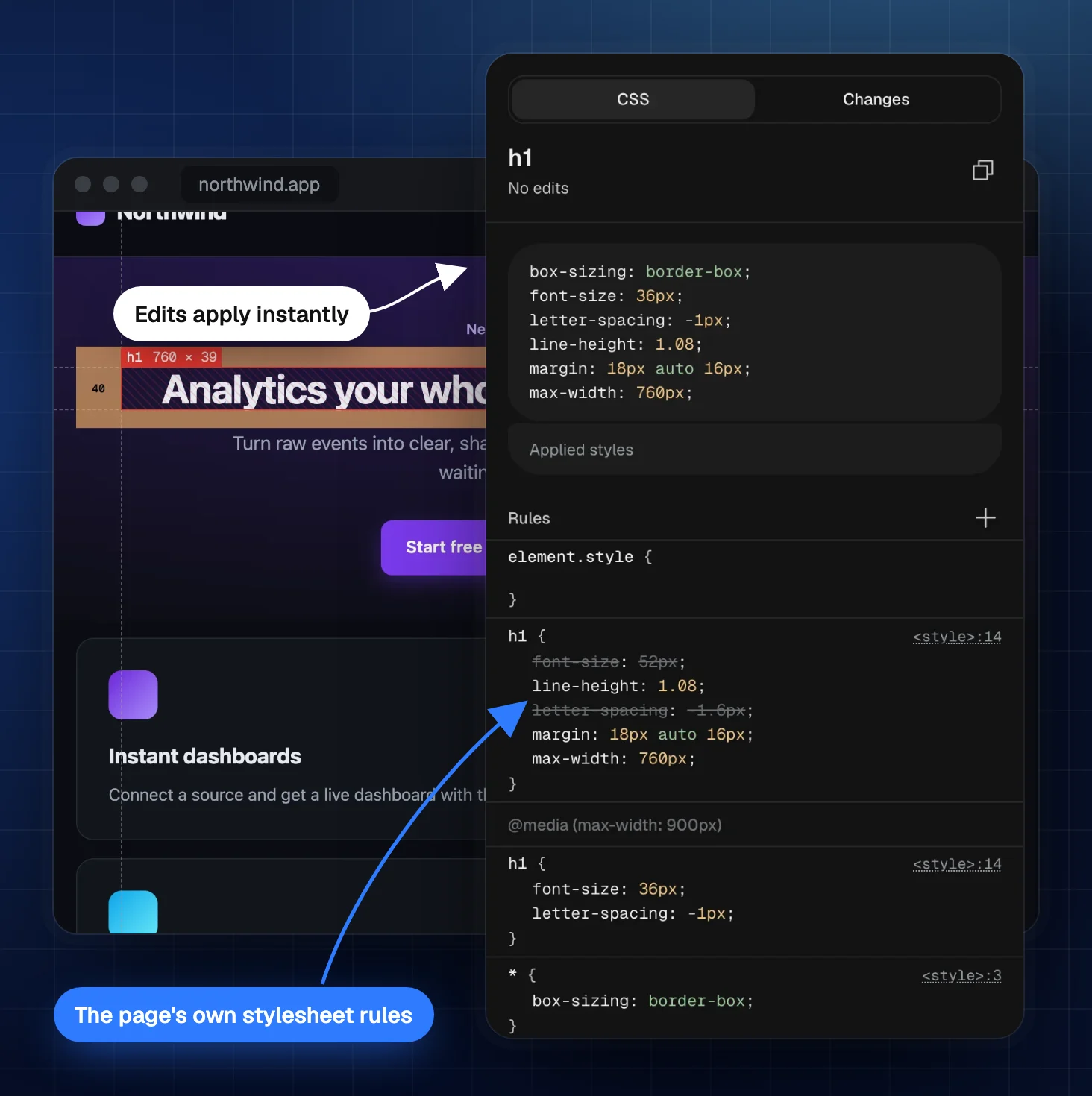
Edit the page's own CSS rules and text, see the result instantly, and copy the changes into your code when they look right.

  • Edit real CSS rules, add new rules and change selectors
  • Edit text in place to test headlines and copy
  • Copy, paste, duplicate or delete elements
  • Undo and redo every change
  • Change diff of everything you edited, ready to copy
  • Edits stay after a reload until you revert them
TruePx live CSS editor: the page’s own h1 rules, edited in place, with the change applied to the heading instantly

Responsive design tester

Every screen size, side by side

Load the live page at phone, tablet and desktop sizes on one canvas and check them together, instead of dragging the window back and forth.

  • 20+ device presets plus custom widths and heights
  • Rotate, zoom from 25% to 200% and scroll in sync
  • Light or dark mode per viewport
  • Inspect and edit inside any viewport
  • Breakpoint overlay for the page's media queries
  • Breakpoint sweep that finds horizontal overflow
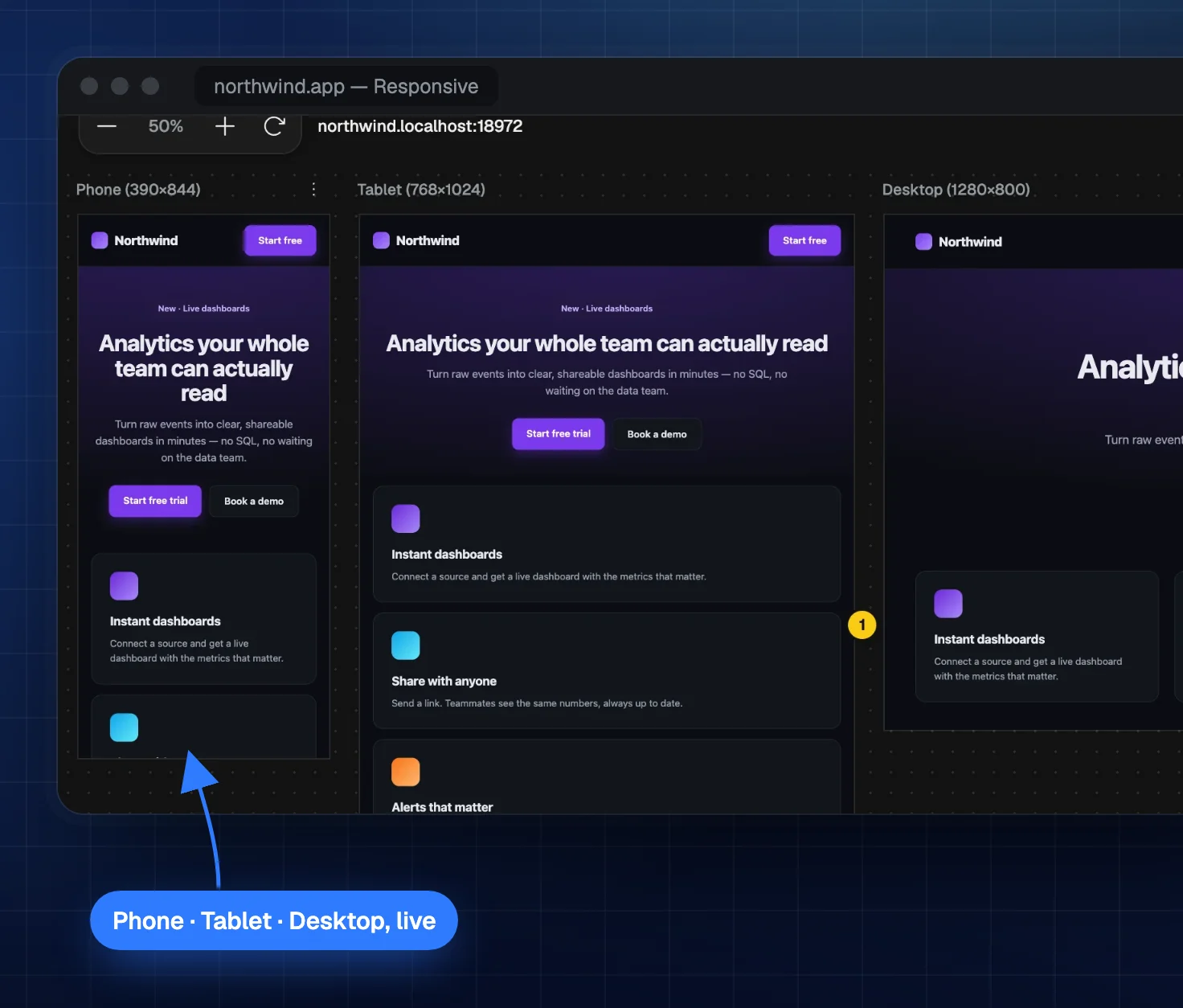
TruePx responsive view: the same page at phone, tablet and desktop widths side by side

Color picker and font inspector

Colors, fonts and assets from any site

Collect the palette and type styles of a page in seconds, and download the images you need.

  • Eyedropper with HEX, RGB, HSL and HSB (press 6)
  • Every color on the page, split into text, background and border
  • Gradients and shadows ready to copy
  • Typography: family, size, weight, line height and letter spacing
  • Font check that tells you which font actually rendered
  • Image format on hover: JPG, PNG, WebP, AVIF or SVG, next to the size
  • Images and SVGs to download, with oversized images flagged
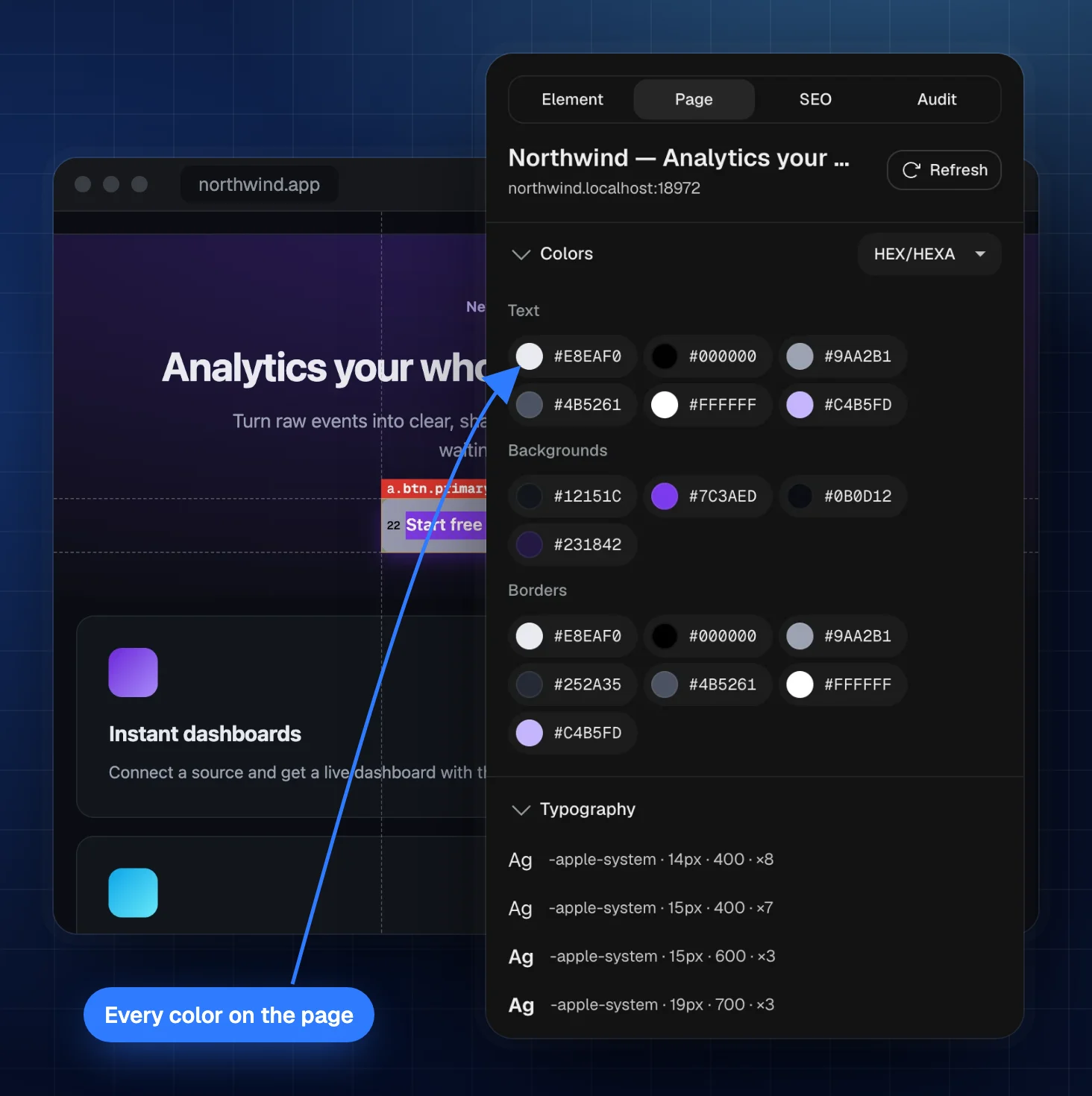
TruePx Page tab listing every text, background and border color on the page, with its fonts below

Website audit · updated in 2.1

Find problems before your users do

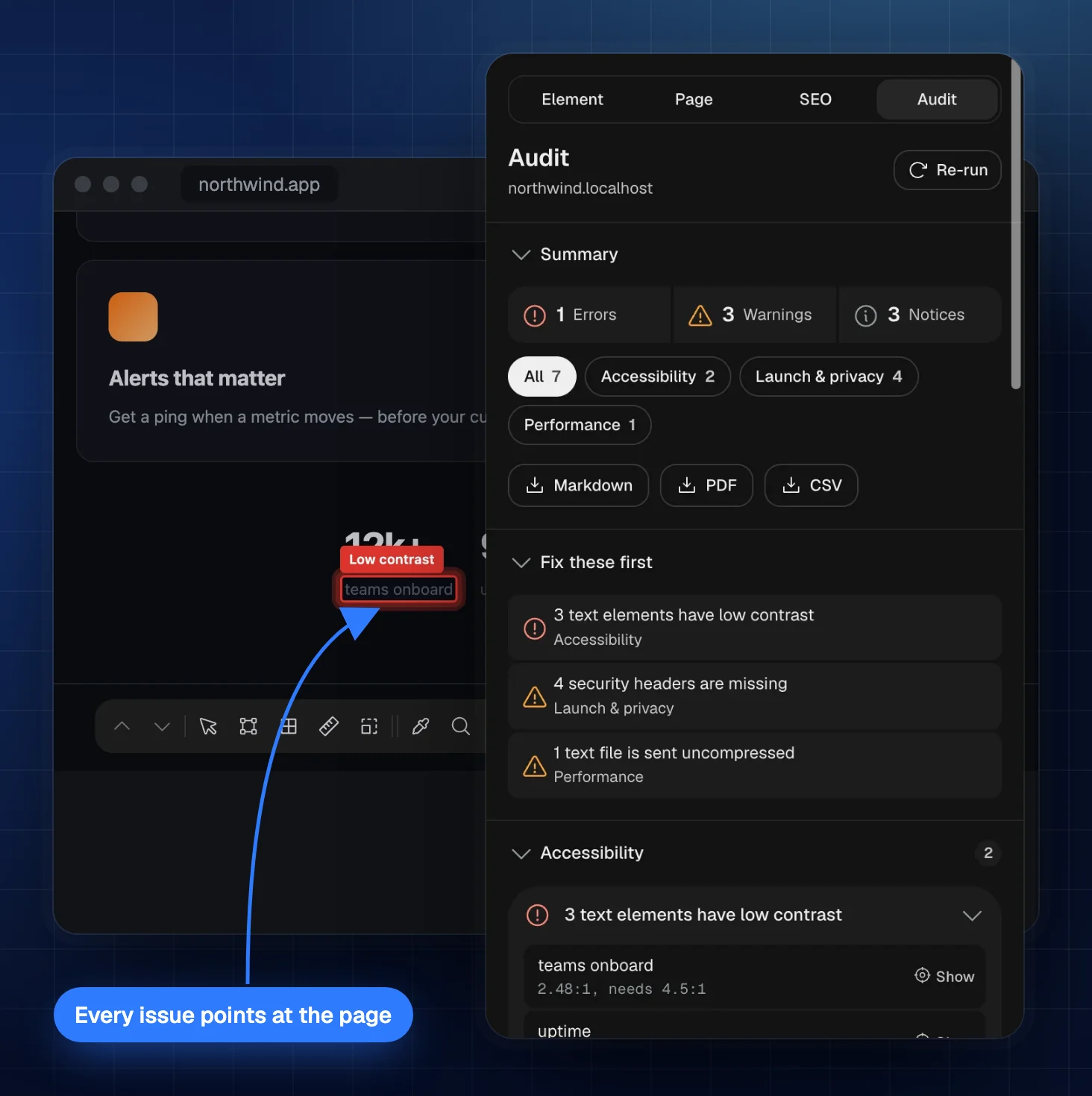
The Audit tab lists everything wrong with a page in one place, worst first. Click any problem and the page scrolls to it, with how to fix it and a Copy for AI button that turns it into a prompt.

  • Accessibility: low contrast measured with axe-core, the engine behind Lighthouse, with a one-click fix. Text on photos and gradients is measured from the pixels on screen. Also missing labels and alt text, small tap targets, hidden focus, and the Tab order drawn on the page
  • Speed: Core Web Vitals measured on your device, the script behind a slow click, heavy or unsized images, and Google's PageSpeed test when you ask
  • Measure the real page load: reloads the tab and reads every file it loads, to find failed files, broken integrity hashes and which outside services cost the most
  • Check the whole page: scrolls through it so scroll animations and lazy images are checked the way visitors see them
  • Content: typos, a grammar check, repeated words, placeholder text and an old © year
  • Launch and privacy: missing security headers, exposed secret keys, mixed content, and trackers that fire before the cookie banner
  • Design and layout: stretched or blurry images, failed web fonts, and layouts that break at other screen widths
  • Reports as Markdown, CSV or PDF, and a re-run that shows what you fixed
TruePx Audit tab with errors, warnings and a fix-first list, and a low-contrast label outlined on the page

SEO checker

See a page the way search engines do

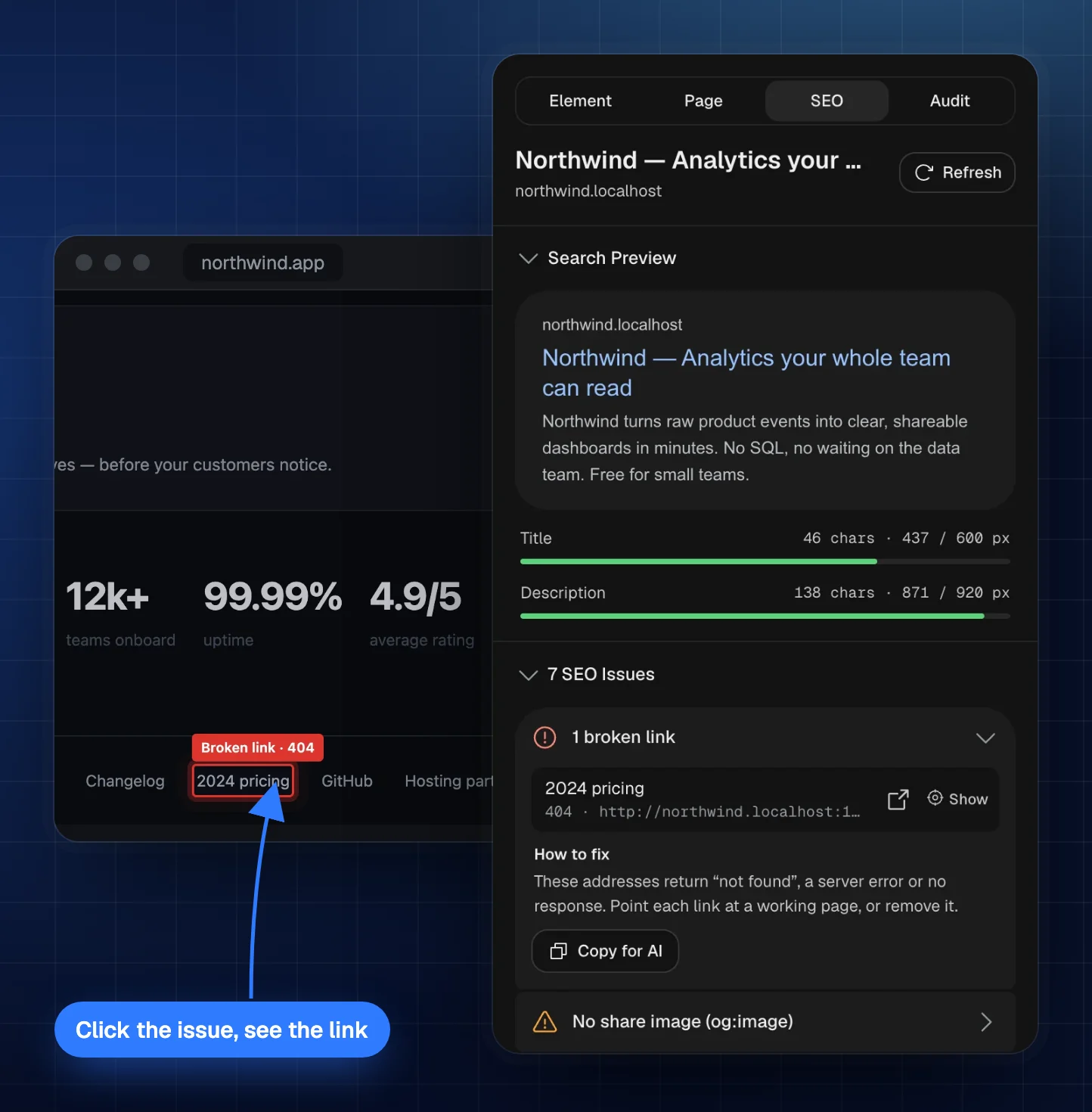
The SEO tab lists what's wrong with a page and where. Click any problem and the page scrolls to it, with a note on how to fix it.

  • Broken link checker finds 404s, server errors, dead domains and redirects
  • Issues that point at the page: missing alt text, empty or skipped headings, jump links to nowhere
  • Search preview with title and description length in real pixels, the way Google cuts them
  • Meta tags, canonical and robots, including the X-Robots-Tag header
  • Headings, links and images with nofollow highlighting and CSV export
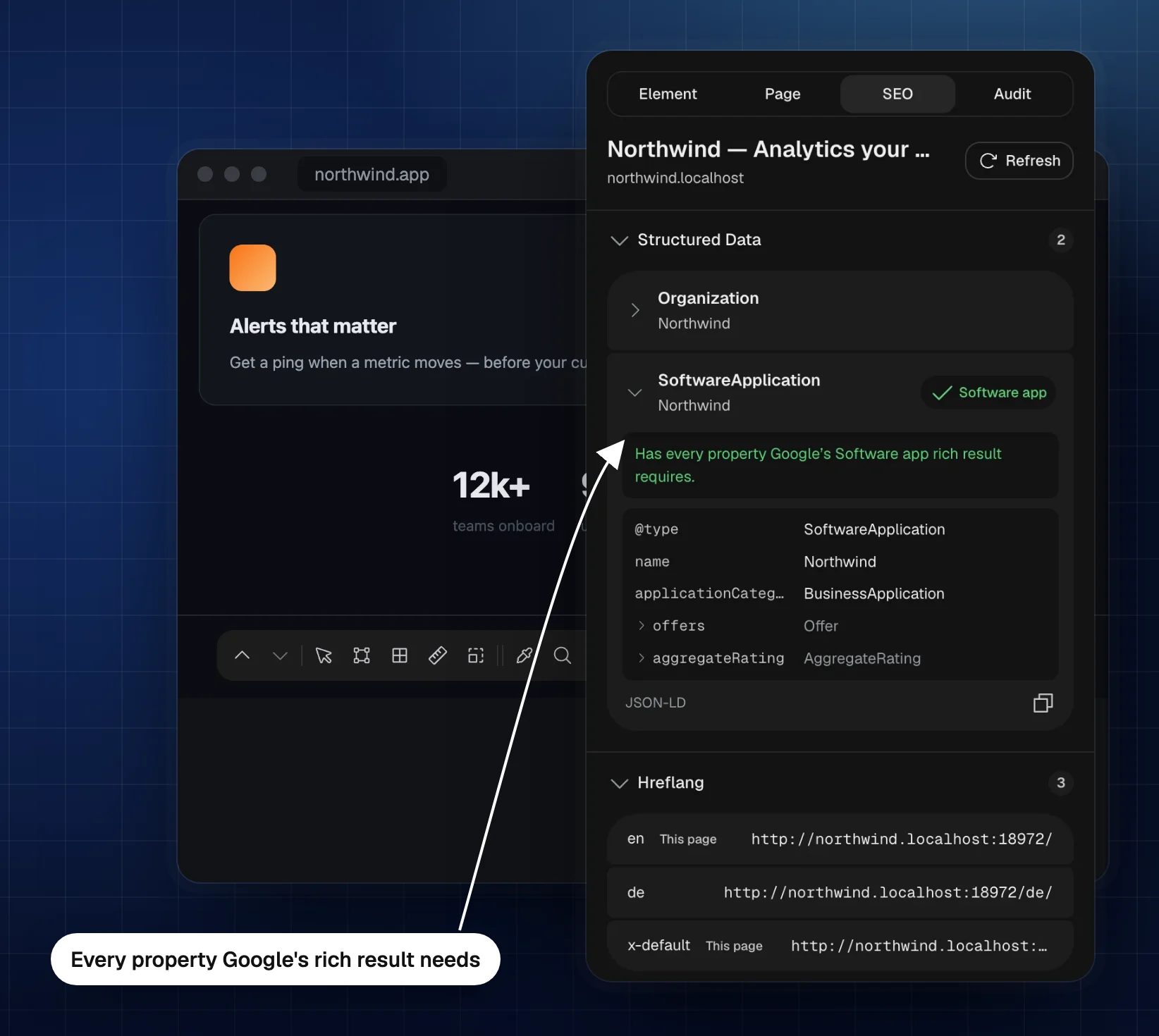
  • Structured data one item per row, with what Google's rich results still need
  • Language versions: checks that each hreflang version links back, which Google needs before it uses them
TruePx SEO tab listing a broken link; the page has scrolled to the 2024 pricing link and outlined it as Broken link 404
TruePx structured data list: a SoftwareApplication item with every property Google’s rich result needs

Design QA

Check the build against the design

Lay the mockup over the live page, see it the way people with color blindness do, and leave notes where something needs fixing.

  • Mockup overlay at fit, 1× or @2x with opacity control
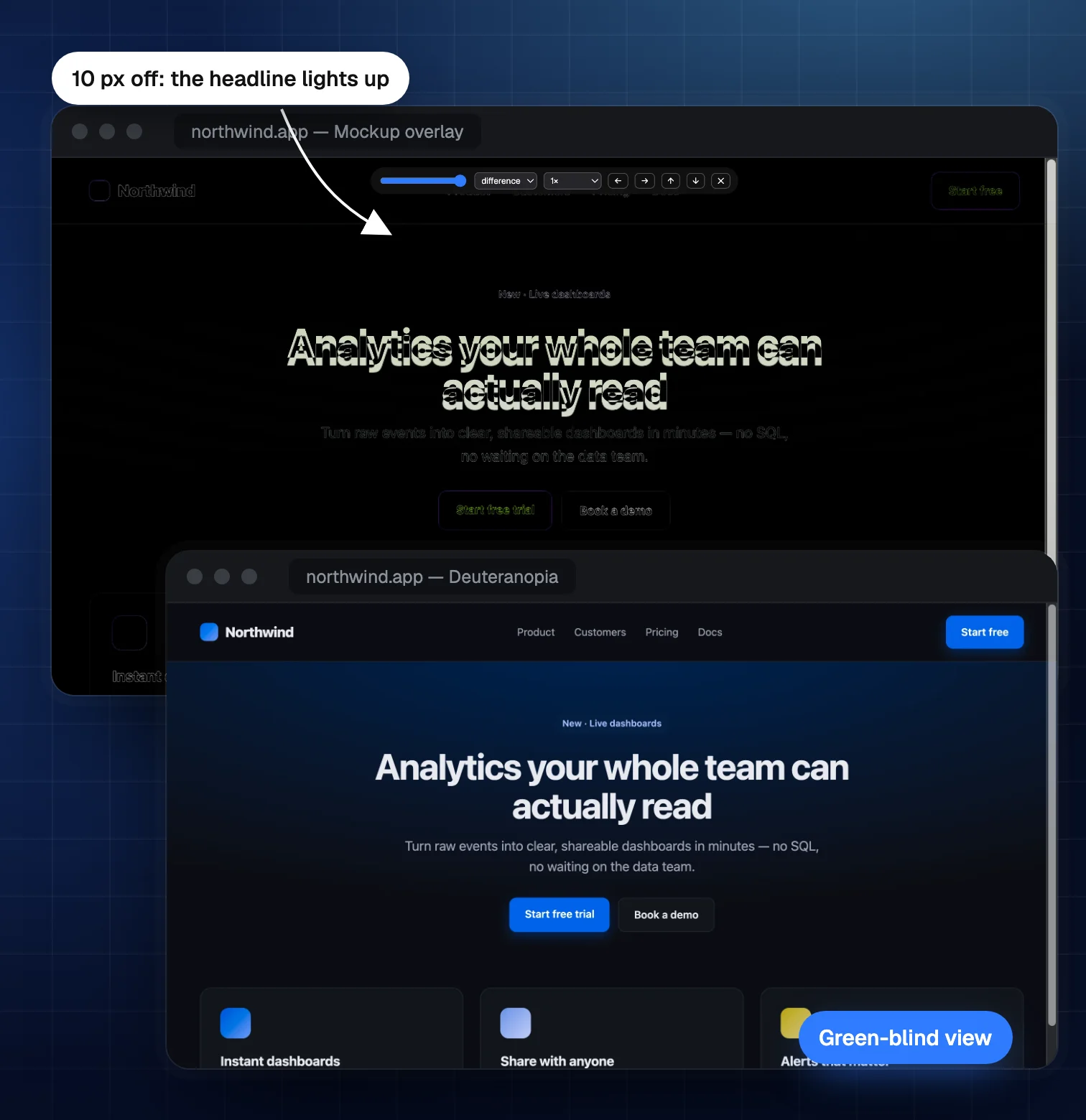
  • Difference blend makes every mismatch light up
  • Color vision simulator: protanopia, deuteranopia, tritanopia and achromatopsia
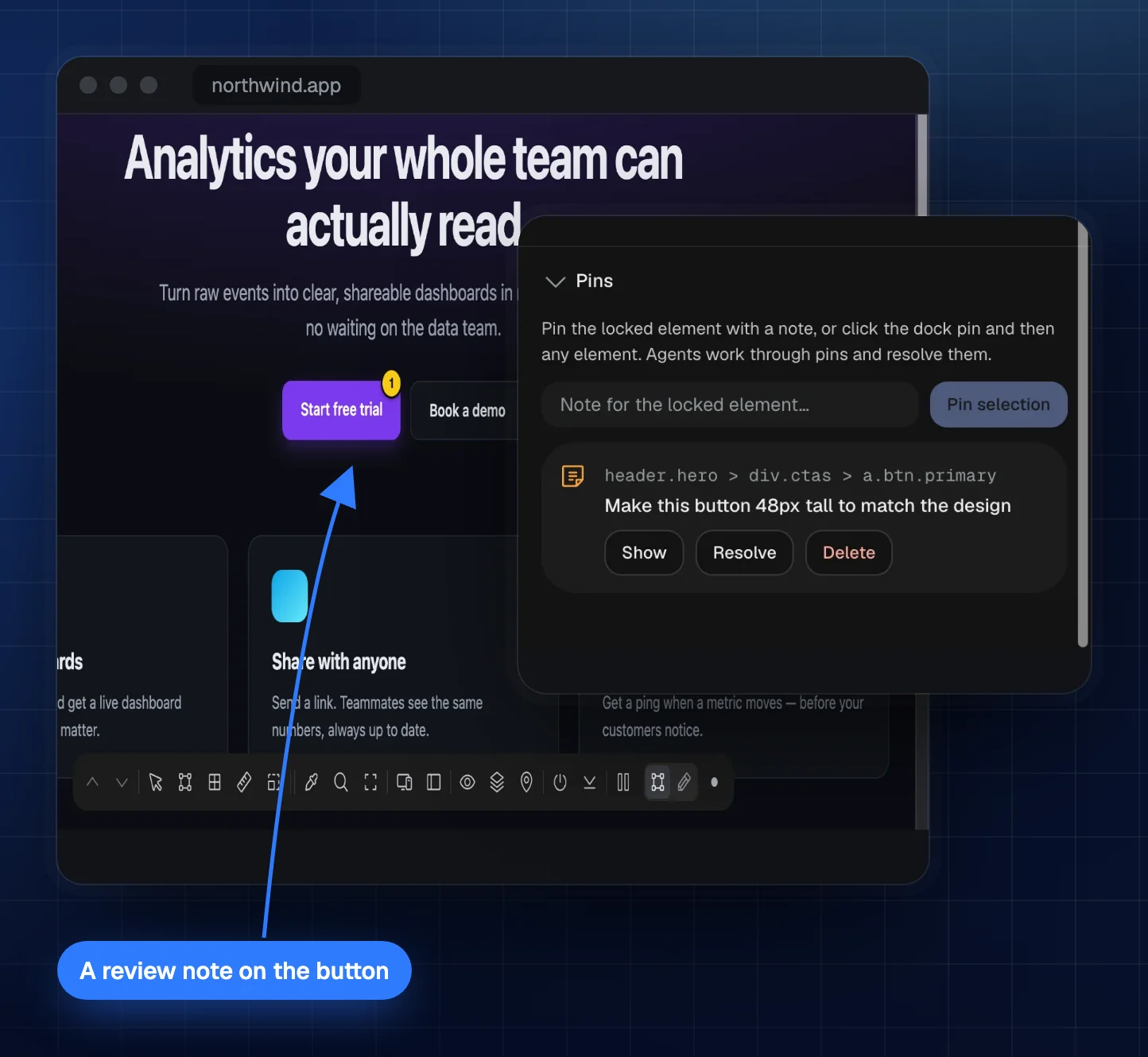
  • Pins: notes attached to elements, saved per page
  • Element screenshots with measurements included (press 8)
  • Consistency scan for buttons and styles that drift
TruePx design QA: a mockup overlay in difference mode lights up a headline that is 10 px off, above a green-blind (deuteranopia) view of the page
Difference mode: everything that matches the design turns black, so the headline sitting 10px too low is easy to spot.
A website shown through the TruePx deuteranopia (green-blind) simulation
Deuteranopia simulation.
A TruePx pin on the Start free trial button, with its review note in the side panel
A pin with a review note.

For AI coding agents (MCP)

Let your AI agent see the page

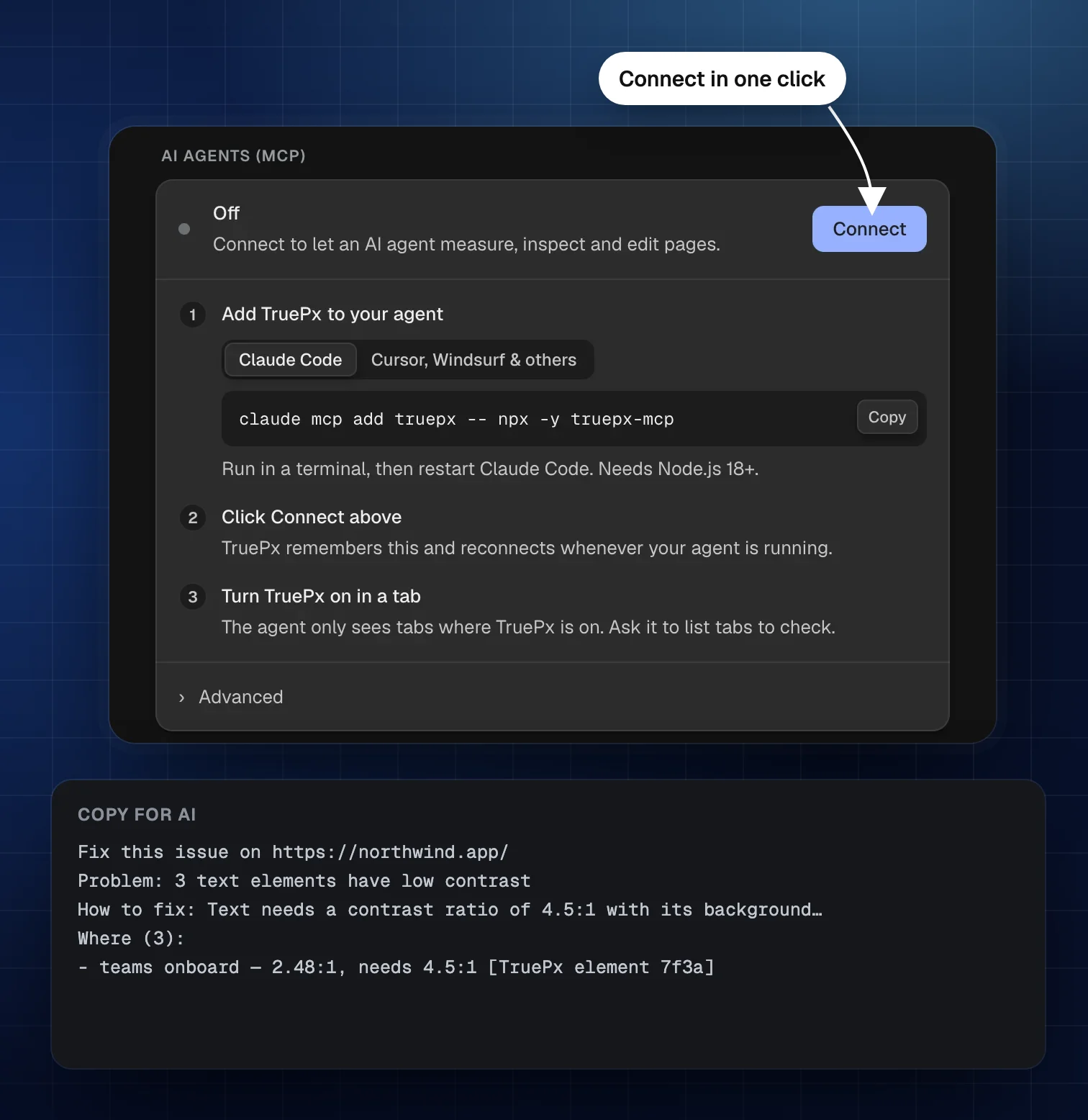
Connect Claude Code, Cursor, Windsurf or any MCP client, and ask it to measure, inspect and fix the page you have open. It gets 61 tools: element sizes, CSS rules, colors, contrast, responsive viewports, screenshots and live edits.

claude mcp add truepx -- npx -y truepx-mcp

Then click Connect in TruePx Settings. The bridge runs on your computer only (Node.js 18+).

  • “Why is the pricing card 12px taller than the others?”
  • “Fix the contrast of the footer links and show me the CSS.”
  • “Check the hero at 390px wide and tell me what overflows.”
TruePx AI agents settings with the one-line Claude Code command and a Connect button, and an issue copied as a prompt for an AI agent

Who TruePx is for

Anyone who needs to know how a page is built, or needs to check that it was built right.

Front-end developers

Build to spec faster and debug layout without digging through DevTools.

  • Check spacing and sizes against the design in seconds
  • See which CSS rule wins and where it comes from
  • Try a fix live, then copy the CSS or Tailwind classes
  • Test every breakpoint side by side
  • Find the element that causes horizontal scroll
  • Hand your AI agent the page through MCP

Designers

Check that what shipped matches what you designed, on the live site.

  • Overlay your mockup and spot differences instantly
  • Measure spacing and type on any site you admire
  • Pick colors, gradients and fonts from any page
  • Check contrast and color blindness before handoff
  • Leave pins on elements that need fixing
  • Preview the design at every screen size

QA and design review

Write bug reports with exact numbers instead of “it looks a bit off”.

  • Measure the actual gap and compare it to the spec
  • Take element screenshots with measurements on them
  • Pin notes to the exact element with a problem
  • Run contrast and overflow checks on every page
  • Check phone, tablet and desktop in one view
  • Confirm fixes after each release

Content and marketing

Preview changes and check the basics without asking a developer.

  • Rewrite headlines and copy in place to see how they fit
  • Find broken links and SEO problems, and jump to each one
  • See how a link will look when shared on social media
  • Check page weight and oversized images
  • Grab brand colors and fonts from any page
  • Share screenshots of proposed changes

AI-assisted developers

Give Claude Code, Cursor or Windsurf real measurements instead of guesses.

  • Let the agent read sizes, CSS rules and colors from the page
  • Have it fix contrast or spacing and verify the result
  • Ask it to check the page at different screen sizes
  • Get screenshots the agent can look at
  • Keep everything on your own computer
  • Undo any agent edit from the TruePx dock

Students and learners

Learn CSS by taking apart the websites you use every day.

  • See the box model of any element
  • Find out how layouts use flexbox and grid
  • Change CSS and watch what happens
  • Study the spacing and type scales of great sites
  • Copy styles as plain CSS or Tailwind
  • Check your own projects for accessibility

Every TruePx feature

All of it is free, and all of it works on any page you open.

Measure

  • Element size on hover
  • Padding and margin bands
  • Distance between two elements
  • Page rulers and crosshair guides
  • Layout grid overlay
  • X-ray outlines
  • Parent and child navigation

Inspect

  • Box model
  • Computed styles and source rules
  • Tailwind class equivalents
  • Flexbox and grid details
  • Floating inspector
  • Find by CSS selector
  • Canvas inspection

Edit

  • Live CSS rule editor
  • New rules and selectors
  • Text editing in place
  • Copy, paste, duplicate, delete
  • Undo and redo
  • Change diff to copy
  • Edits kept after reload

Colors, fonts and assets

  • Eyedropper color picker
  • HEX, RGB, HSL and HSB
  • Page color palette
  • Gradients and shadows
  • Typography styles
  • Rendered font check
  • Image format on hover
  • Image and SVG download

Test and audit

  • Website audit, worst first
  • Real page-load measurement
  • Whole-page contrast check
  • Core Web Vitals and PageSpeed test
  • Typo and grammar check
  • Security headers and trackers
  • Tab order overlay
  • Responsive preview, 20+ devices
  • Per-viewport light and dark mode
  • Breakpoint overlay and sweep
  • WCAG contrast check and fix
  • Broken link checker
  • SEO search preview
  • Headings, links and alt text
  • Structured data and hreflang return links
  • Social share preview
  • Page weight and technologies

Review and automate

  • Mockup overlay with difference blend
  • Color vision simulator
  • Pins with notes
  • Element screenshots
  • Consistency scan
  • MCP bridge for AI agents
  • 22 languages

Keyboard shortcuts

Every tool has a key, so you can keep your hand off the dock. On a Mac, Alt is the Option key.

Turn TruePx on or off
Alt Shift S
Select the parent or first child
Alt Shift ↑ / ↓
Floating inspector
1
X-ray
2
Layout grid
3
Rulers
4
Breakpoints
5
Color picker
6
Find by selector
7
Screenshot
8
Responsive preview
9
Side panel
0
Turn off
Esc

What you look at stays in your browser

TruePx runs only on the tab where you turn it on. There is no account, no analytics and no tracking. Your preferences, edits and pins are stored in your browser and deleted when you uninstall. Two optional checks contact an outside service, and only when you click them: Google’s speed test gets the page address, the grammar check gets the page’s sentences.

Read the privacy policy

Questions and answers

Can't find what you need? Email hello@truepx.xyz and you'll get a reply.

Is TruePx free?

Yes. TruePx is completely free. There is no paid plan, no trial and no account to create.

How do I measure pixels on a website?

Install TruePx, open the page, and click the TruePx icon or press Alt Shift S. Hover any element to see its width and height, with its padding and margin drawn around it.

How do I measure the distance between two elements?

Turn TruePx on, click the first element to lock it, then hover the second element. TruePx draws the horizontal and vertical gap between them in pixels.

Can I see the CSS of any element without DevTools?

Yes. Click an element and open the side panel (press 0). It shows the box model, computed styles, the CSS rules that apply, fonts, colors and Tailwind class equivalents, each with a copy button.

Do my edits change the website for other people?

No. Edits only change the page in your own browser. TruePx keeps them after a reload so you can keep working, until you revert them.

How do I check color contrast for WCAG?

Select an element or section. The side panel lists every text that fails WCAG AA contrast with its ratio, and a Fix button applies the smallest color change that passes.

Can I test a responsive design with TruePx?

Yes. Responsive preview (press 9) shows the page at phone, tablet and desktop sizes side by side, with more than 20 device presets, custom sizes, rotation, zoom and a light or dark color scheme per viewport.

Which browsers does TruePx support?

TruePx is built for Google Chrome version 116 or newer.

How do I audit a website for accessibility and speed?

Turn TruePx on, open the side panel and choose Audit. It lists contrast, label, speed, content, security and layout problems on the page, worst first. Click one and the page scrolls to it, with how to fix it.

Does TruePx collect my data?

No. TruePx runs only on the tab where you turn it on, has no analytics or tracking, and stores preferences and edits only in your browser. Two optional checks call an outside service only when you click them: the grammar check (LanguageTool) and Google’s speed test. See the privacy policy.

How do I connect TruePx to Claude Code or Cursor?

For Claude Code, run claude mcp add truepx -- npx -y truepx-mcp. For other clients, add the truepx-mcp server to your mcp.json. Then click Connect in TruePx Settings and turn TruePx on in a tab.

Stop guessing how many pixels it is

Install TruePx and measure, inspect, edit and audit the next page you open.

Add to Chrome, it's free